Unplugged UP Phone Review: Why I Stopped Using It
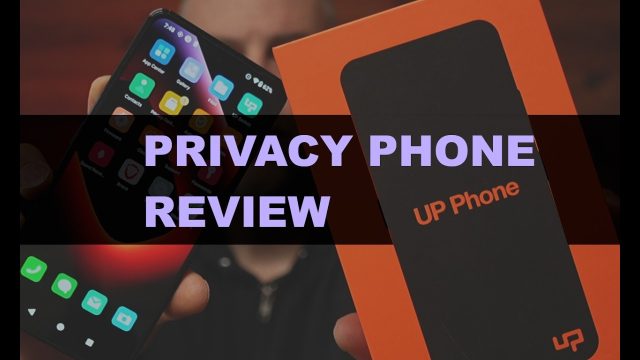
Back in October of 2025, I decided to start taking my online and digital privacy a lot more seriously. That journey led me to the UP Phone by Unplugged — a device marketed as one of the most privacy-focused smartphones on the market. I bought one myself, used it as my daily driver, and put it through its paces. In this post, I’m sharing a full breakdown of the hardware, the standout privacy features, and the real-world issues that ultimately led me to stop using it altogether.
Hardware and Key Specifications
Let’s start with what’s under the hood. The UP Phone is built around a MediaTek Dimensity 1200 CPU (MediaTek is a chipmaker that produces processors used in many budget-to-midrange Android phones). It comes with 8GB of RAM and 256GB of internal storage, with a microSD card slot that lets you expand storage up to an additional 1TB.
The display is a 6.6-inch screen, and the camera system includes a 108-megapixel main sensor, an 8-megapixel ultrawide lens, and a 5-megapixel macro lens. The battery is rated at 4,300 mAh (milliamp hours, a measurement of battery capacity).
A few hardware features really set this phone apart from anything else on the market:
- A physical hardware kill switch that completely severs the connection between the battery and the rest of the device’s circuits — a true hard disconnect from the CPU and motherboard.
- A dedicated, customizable privacy button that can be configured to pull up specific apps or menus of your choosing.
- A side-mounted fingerprint sensor.
- A microSD card slot for expandable storage.
That said, it’s worth noting that this hardware is fairly dated. Spec-wise, it’s roughly comparable to a Google Pixel 6a. Considering Google is now releasing the Pixel 10, and phone manufacturers typically release a new flagship about once a year, that puts the UP Phone’s hardware somewhere around five to six years behind current smartphone technology.
Battery Life
If I had to name one straightforward complaint about this phone, it’s the battery. It’s rough. I found myself having to plug in the charging cable once a day just to keep the phone alive — and even then, if I skipped a day, the phone was pretty much guaranteed to die by day two. Compare that to my iPhone and other modern Android devices, which can comfortably go multiple days on a single charge. This is a real drawback if you’re used to more modern battery efficiency.
Security and Privacy Features
Now let’s get into what makes this phone genuinely interesting — its privacy-focused features.
Physical Battery Disconnect: As mentioned above, this phone has a literal hardware switch that physically disconnects the battery. This is huge, because many phone manufacturers — including Apple and various Android OEMs — have made it nearly impossible to fully power down a device in a way that prevents it from sending data or “phoning home” even when it appears to be off.
The Privacy Center App: This is where most of the phone’s privacy magic happens. The standout feature here is an on-device ad and tracking firewall. Unlike most tracking-blocker apps that work by routing your traffic through a VPN tunnel and filtering it there, the UP Phone’s firewall blocks tracking packets directly on the device, before they ever leave the network interface. This is a genuinely unique approach compared to most privacy tools on the market.
The Privacy Center also gives you granular toggles for content and hardware control, including:
- Blocking social media, gambling, or adult content
- Toggling access to the camera, microphone, USB data port, NFC, and Wi-Fi chip
- Disabling 2G network connectivity (an older, less secure cellular standard)
- Turning off Bluetooth and GPS entirely
One limitation to be aware of: these toggles are phone-wide. There’s no way to grant certain permissions to specific apps only — it’s an all-or-nothing switch across the entire device, which isn’t ideal if you were hoping for more granular, per-app control.
The Access Screen: This section lets you configure your fingerprint settings, set up custom shortcut buttons, enable Lost Mode, and set up an Emergency Reset feature. The Emergency Reset is particularly clever — it lets you create a secondary PIN code that, when entered at the lock screen, completely wipes the device and restores it to factory settings. This is designed for situations where you might be coerced into unlocking your phone for someone; instead of giving them your real PIN, you give them the secondary one, and the device wipes itself instead of unlocking.
There’s also a Scheduled Reboot feature, which automatically restarts your device at a time you choose each day. This clears out the current memory state, wiping any potentially stale or vulnerable security information sitting in RAM and giving your phone a fresh start on a regular basis.
Built-in VPN: The UP Phone includes its own VPN client (VPN stands for Virtual Private Network, a service that routes your internet traffic through an encrypted connection to mask your IP address and location). Unplugged advertises this as a no-log VPN, meaning they don’t track which IP addresses your device connects to while you’re using it.
Built-in Antivirus: There’s also a malware scanning tool built into the device, which lets you scan installed apps for malware and trackers. It’s a handy feature to have baked directly into the OS.
Zero-Knowledge Photo Storage: The Photos app supports zero-knowledge cloud storage, meaning Unplugged encrypts your photos in a way that even they cannot access your data, even if compelled to. In fact, during one of the company’s podcast appearances, the CEO mentioned that a government entity (reportedly the Department of Justice) requested access to a user’s cloud photos and Unplugged was unable to provide it because of this zero-knowledge encryption. That’s a strong privacy guarantee if keeping personal photos private in the cloud matters to you.
Is It Worth $999?
Now let’s talk price and whether it’s actually worth it. The UP Phone retails for $999, and after the first year, there’s an additional $12.99/month fee to keep using their VPN service and secure cloud photo storage.
For comparison, that same $12.99/month could get you a Proton subscription, which includes not just a VPN, but also a secure encrypted email address, a secure calendar, and 500GB of zero-knowledge encrypted cloud storage for any type of file — not just photos. The UP Phone’s cloud storage, by contrast, is limited to photos only.
To put the value into real terms: I was able to buy a Google Pixel 10 for $550, flash GrapheneOS onto it (a privacy and security-focused open-source Android operating system), and pair it with a Proton subscription for $6.99/month. Doing the math, that setup gives me roughly eight years of Proton service for the same total cost as the UP Phone alone.
My Real-World Experience
Beyond the specs and features, here’s what actually happened when I used this phone day-to-day.
Right out of the gate, on day one, transferring my contacts over caused a major issue. The transfer tool (the “Upswitch” app used to migrate contacts from an iPhone or Android device) added a “+” character in front of every phone number, breaking the ability to call or text anyone. I didn’t even notice until weeks later, when I tried calling and texting a family member and kept getting a “number not in service” message — turns out it wasn’t disconnected, it was just formatted incorrectly by the transfer tool.
App compatibility was mostly fine, with one notable exception: the X (formerly Twitter) app did not work when I first set up the phone, which was surprising given how much promotion Unplugged has done through X. There is a web-based workaround available now, but the native app still isn’t functioning properly. Aside from that, most of my everyday apps — banking, Instagram, Facebook — worked without issue. If you rely on Google apps or services, though, you’ll need to manually install Google Mobile Services and Google Play, which somewhat defeats the purpose of a privacy-focused phone by opening it back up to Google’s ecosystem.
The most serious issue I ran into was a networking problem. At home, we use a T-Mobile hotspot for Wi-Fi, and the UP Phone simply would not connect to it. After some digging, we discovered that T-Mobile was assigning an invalid IPv6 DNS address to the phone. Every other device I own — laptops, phones, even my Roku — has IPv4 fallback support, meaning if IPv6 (the newer internet addressing protocol) isn’t configured correctly, the device automatically falls back to the older, more widely supported IPv4 standard. The UP Phone does not have this fallback. Practically speaking, this means there’s a real chance the phone won’t connect properly to Wi-Fi networks that aren’t perfectly configured for IPv6 — which, unfortunately, is a lot of networks out there, especially when traveling.
I reported this issue to Unplugged’s support team and even sent them packet captures to help their engineering team troubleshoot. Three months went by without a real fix. During that time, I actually missed an important message from a family member during a storm because of this connectivity issue. That was the breaking point for me — I couldn’t keep relying on a device I couldn’t trust to stay connected when it mattered.
Final Thoughts
The UP Phone has some genuinely innovative privacy features — the hardware kill switch, the on-device tracking firewall, the emergency wipe PIN, and zero-knowledge photo storage are all excellent ideas that most mainstream phones simply don’t offer. But between the outdated hardware, poor battery life, early software bugs, and a serious unresolved networking issue that caused me to miss an important message, I can’t currently recommend it at the $999 price point — especially when a GrapheneOS setup paired with a service like Proton can deliver comparable or better privacy for a fraction of the long-term cost.
For me, this was a case of really wanting to love a product and support what the company is trying to do, but ultimately having to step back and use what actually works reliably for my day-to-day life.